CS2 Crosshair Codes Guide 2026 (Pro Settings)

The crosshair in CS2 affects too many things, so it's worth customizing. Many players constantly experiment with the crosshair and add new enhancements to make their aiming even more effective.
In addition, many are constantly suggesting new crosshair features, such as in this discussion on Reddit.
But if you don't know what you want or are too lazy to customize your crosshairs, you can copy them from professional players.
Highlights
- General information on how to adjust the crosshairs
- Crosshair codes of professional players in CS2
How to Use Crosshair Codes in CS2

Step-by-Step Guide to Entering Crosshair Codes
Among the valuable features you can use in Counter-Strike 2 is "Crosshair Code". All you have to do is copy the crosshair settings of a particular player and enter a unique code in the import box.
To import a crosshair code:
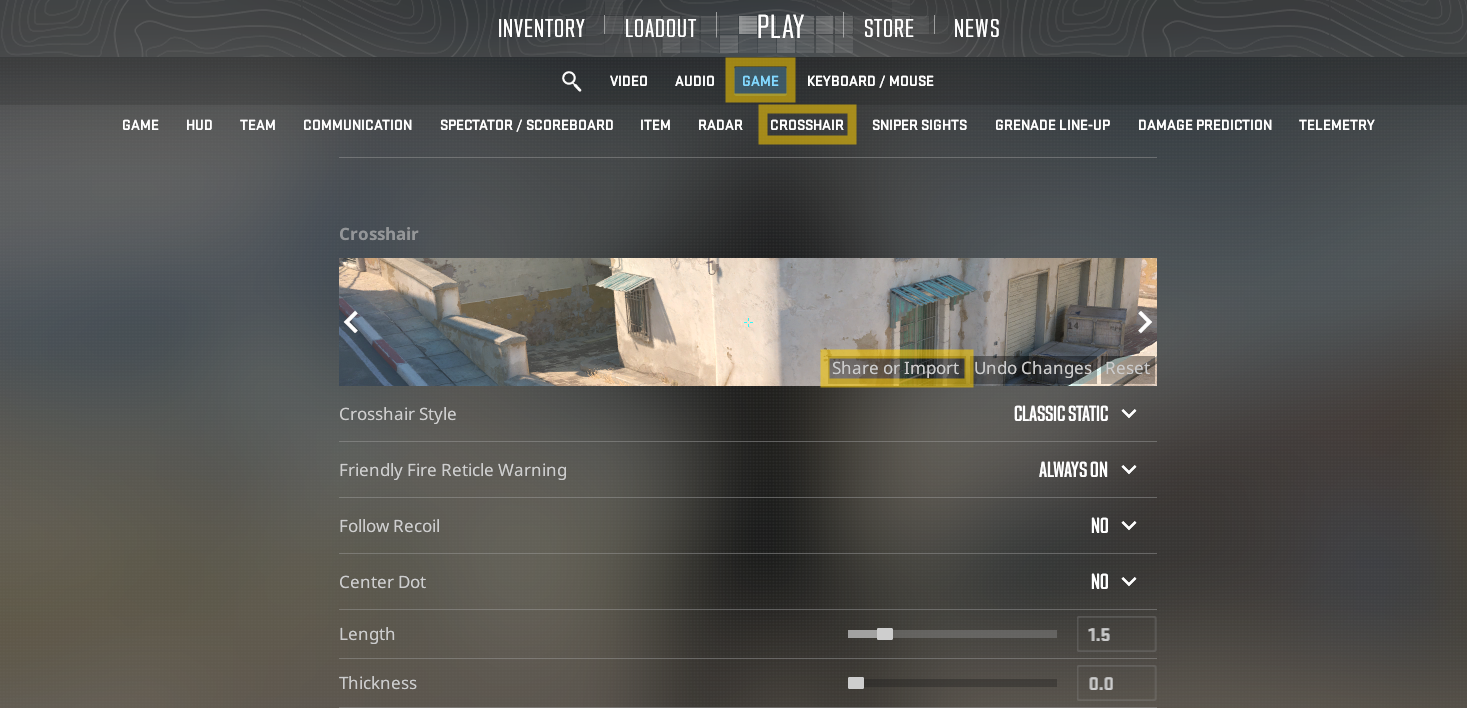
- Open Settings in CS2
- Navigate to the Game tab
- Select Crosshair

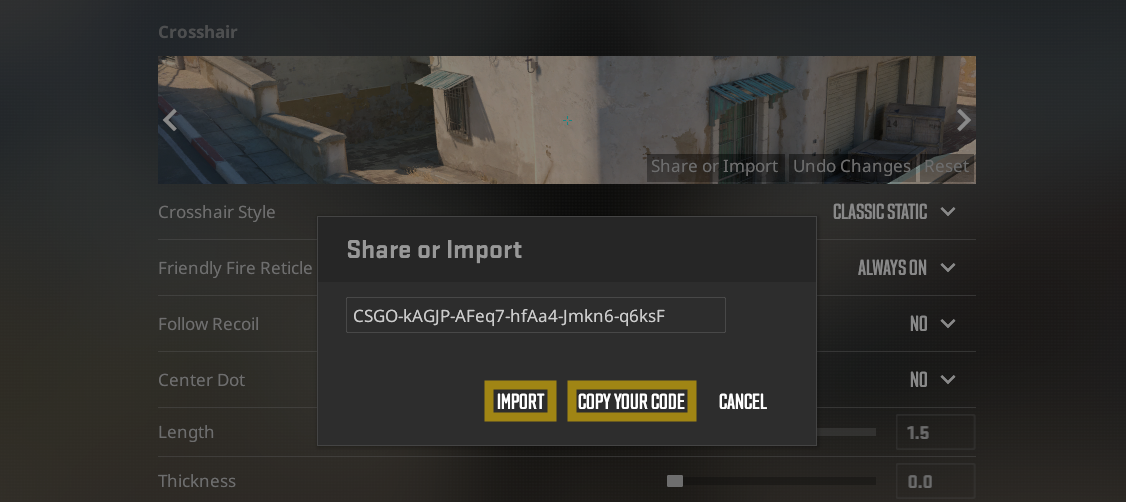
4. Click the “Share or Import” button next to the crosshair preview
5. Paste the desired crosshair code into the input field
6. Click “Import” to apply the settings
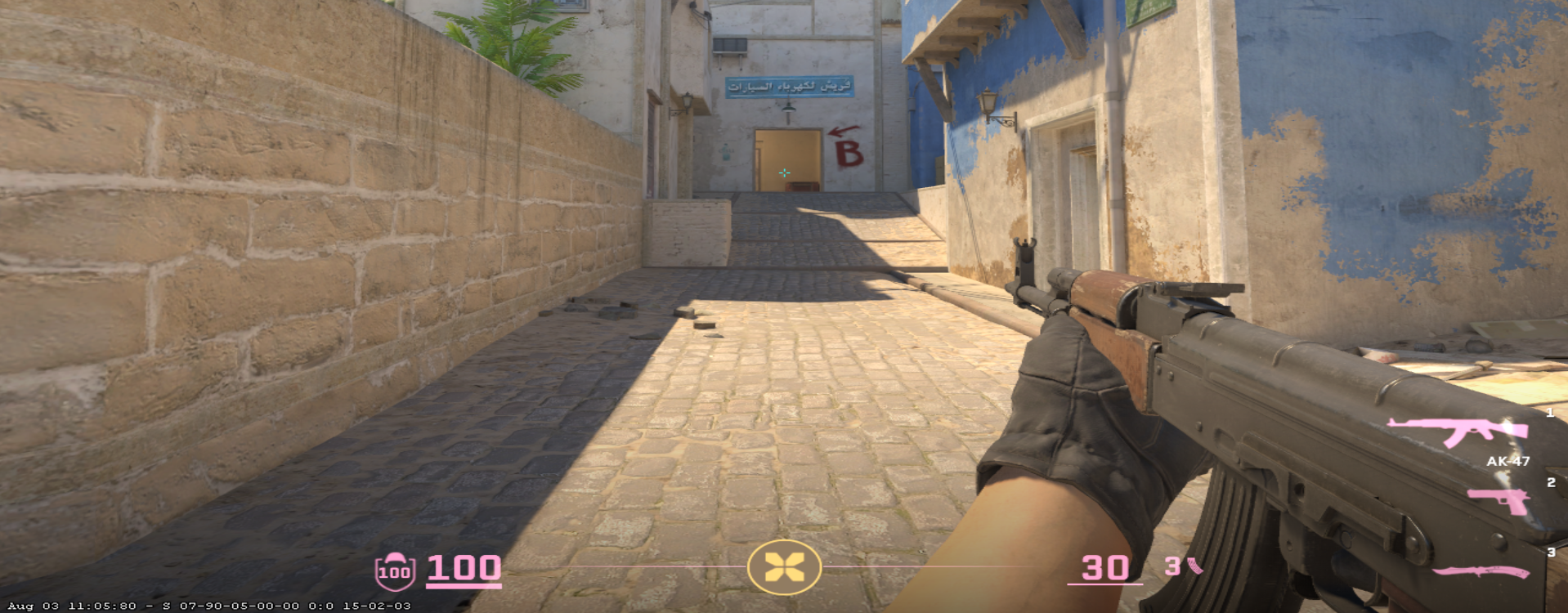
Your crosshair will update immediately after importing the code.

After importing a crosshair code, the next step is to test it in real gameplay conditions. Platforms like xplay.gg allow players to practice and play on dedicated CS2 servers, making it easier to evaluate how your crosshair performs in real matches, aim duels, and movement scenarios.
If you want to share your own settings:
- Open the same “Share or Import” menu
- Click “Copy Your Code”
- Send it to friends or save it for later use
This system makes it easy to test pro player crosshairs or quickly switch between different setups without manually adjusting each parameter.
Common Issues and Troubleshooting
Some players have complained in CS2 that their crosshair is reset to default settings whenever they open the game. Only some changes the player makes each time they open the game are saved.
Changing the crosshair every time is very difficult and tedious, and even importing the code could be more convenient.
Try to solve the problem by customizing the crosshair via a file in Autoexec. Just make sure you use the new path /game/cfg/ and include the crosshair command there—for example, cl_crosshairdot.
That way, the crosshair will be saved every time you run.
How Resolution and Aspect Ratio Affect Your Crosshair in CS2
Your crosshair in Counter-Strike 2 doesn’t exist in isolation — its appearance and feel are напрямую influenced by your resolution and aspect ratio settings. This is one of the most overlooked factors when copying pro player crosshair codes.
Why the Same Crosshair Looks Different
Even if you import the exact same crosshair code, it may not look identical to what you see in pro gameplay. This happens because:
- Resolution scaling changes thickness and spacing
- Aspect ratio alters horizontal stretching
- Monitor size and pixel density affect perceived sharpness
As a result, a crosshair that looks perfect for one player may feel too thick, too small, or even blurry for another.
4:3 vs 16:9 Crosshair Differences
The most common comparison in CS2 is between 4:3 stretched and 16:9 native:
- 4:3 stretched
- Crosshair appears wider and slightly thicker
- Targets also look larger, which some players prefer for aiming
- Popular among aggressive riflers
- 16:9 (native)
- Crosshair looks more precise and proportionally accurate
- Better for long-range clarity and holding angles
- Preferred by many AWPers and passive players
How to Optimize Crosshair Visibility
To get the best results from any crosshair code:
- Test it on your actual resolution and aspect ratio
- Check visibility on different maps (especially bright vs dark areas)
- Adjust thickness or color if needed (green and cyan remain top choices in 2026)
- Avoid blindly copying pro settings — adapt them to your setup
If a crosshair feels “off” after importing, don’t discard it immediately. Small tweaks — like increasing size by 0.5 or adding a subtle outline — can make a huge difference without changing the overall style.
Popular CS2 Crosshair Codes
Many players who follow the esports scene always want to know what crosshair the pro players use at any moment, so they create resources that capture this.
Here are the main types of best CS2 crosshair codes and crosshairs of professional players.
Dot Crosshair Code
We will provide the code for the basic dot crosshair in CS2: CSGO-JaaMN-QODox-vueWF-sdtLn-PU9vO.
It's green, and you can change the color, size, and a few other parameters to your liking.

We'll also leave the code for the crosshair without outlines. However, while this may be less distracting, it is tough to keep track of CSGO-rpnKr-SAeJq-EDzHA-e9Ocf-tUfOQ.

Best Crosshairs for CS2 Headshots
If you're looking for the best CS2 crosshair for headshots, a small, static crosshair remains the most reliable choice. This type of crosshair is widely used by professional players because it provides consistent accuracy in all combat situations.
Its compact size and static behavior make it easier to keep your aim at head level and land precise shots, whether you're holding angles or taking duels. Despite using a simple green color, it stays clearly visible across most CS2 maps.
- Crosshair Style: Classic Static;
- Friendly Fire Reticle Warning: Always Off;
- Follow Recoil: No;
- Center Dot: No;
- Length: 1.6;
- Thickness: 0.7;
- Gap: -2.5;
- Outline: 1.0;
- Red: 0;
- Green: 255;
- Blue: 0;
- Alpha: On, 255;
- T-style: No;
- Deployed Weapon Gap: No;
- Show Player Crosshairs: Personal Preference.
For consistent headshots in CS2, choose a high-contrast crosshair color that stays visible in all situations — cyan (0 / 255 / 255) is generally the best option in 2026 due to its strong visibility across most maps, while green (0 / 255 / 0) remains a reliable default; if you prefer a cleaner look, white (255 / 255 / 255) can work well for precision, but may blend into bright areas, so the key is to pick a color that never “disappears” during fights on your specific resolution and settings.
If you want to explore more updated CS2 pro settings, crosshair codes, and gameplay guides, you can find additional resources and configurations in blog xplay.gg.
CS2 Crosshair Codes (2026 Update – Pro Player Settings)
If you want to go beyond just crosshair codes and explore full pro player and influencer configurations in CS2, you can check the CS2 pro configs section on xplay.gg. It’s a curated database where you can find complete settings used by professional players — including crosshair, viewmodel, sensitivity, and launch options — and copy them in just one click.
The section is also organized in a way that makes it easy to discover configs by country, or team, so you can quickly find setups from your favorite pros or regional players and compare how different styles of play translate into in-game settings.
Crosshair settings in CS2 remain one of the most personal and impactful parts of competitive play. In 2026, most professional players still prefer minimal, highly visible and consistent crosshairs that reduce visual noise and improve precision.
Below are updated crosshair codes used by top-tier professionals:
donk Crosshair Code
donk uses a consistent base crosshair setup, but he occasionally adjusts the color depending on the map to maintain maximum visibility. However, the core crosshair settings remain the same across all matches.

Crosshair code: CSGO-3ozJu-2aJQf-8zDfP-4YGJV-yCAMK
Crosshair code (white): CSGO-LdXHk-hatWX-JjEa8-tuLDN-5tbJD
s1mple Crosshair Code

Crosshair code: CSGO-E8xcE-27Lmw-2ipNt-3HZvp-pevvE
Esports player Oleksandr “s1mple” Kostyliev has been recognized as one of the greatest players in Counter-Strike history, earning multiple Top 1 HLTV rankings and consistently setting performance records at the highest level of competition.
s1mple uses a medium-sized crosshair with a center dot, designed for precise aiming and strong visual focus. His setup is typically set in a light blue (cyan) color, which provides excellent visibility in most in-game environments.
While using s1mple’s crosshair can help improve comfort and consistency, it does not guarantee better performance. To reach a high rank in CS2, you still need to develop strong fundamentals, game sense, and mechanical skill through regular practice and competitive play. If you need a guide, you'll find everything you need on the xplay.gg blog. For example: Best Maps for Aim and Reaction Training in CS2
ZywOo Crosshair Code

Crosshair code: CSGO-33tjH-QWX3U-KcSnD-wu3wu-i2pxA
Crosshair code 2: CSGO-5mANz-GcqoS-5F9ry-oPJL3-EkTiA
Zyw0o is a French professional CS2 player who plays for Vitality as a sniper. His crosshair is typically low gap and thin lines for precise head-level aiming. This type of crosshair fits his playstyle perfectly: ZywOo is extremely consistent in micro-adjustments and angle holding, so a tight, distraction-free crosshair helps him maintain accuracy in high-pressure situations.
m0NESY Crosshair Code

Crosshair code: CSGO-wAD3c-ykt5L-zvZ98-vBisR-6sWPA
One of the best snipers in the world, if you're aiming for the fastest flicks in your pugs, the CS2 crosshair from m0NESY is what you need.
NiKo Crosshair Code

Crosshair code: CSGO-d7yNw-RVvip-Jk8KY-cGYPy-8emwG
Considered the greatest riffler in Counter-Strike history, NiKo has his own crosshair and maybe it's the one that will help you make up your mind.
Spinx Crosshair Code

Crosshair code: CSGO-eZRKJ-AoSuq-PocrV-qA39z-C8XXC
sh1ro Crosshair Code

Crosshair code: CSGO-QiN7q-of7eY-ttDHP-k6tzC-fuzQN
ropz Crosshair Code

Crosshair code: CSGO-nCfX7-54ue9-aC5eV-6Womf-Q6izO
ropz, Twistzz's former FaZe Clan mate, is arguably the best lurker in the world, so his crosshair is the perfect choice if his playstyle matches yours.
electronic Crosshair Code

Crosshair code: CSGO-wAD3c-ykt5L-zvZ98-vBisR-6sWPA
Frozen Crosshair Code

Crosshair code: CSGO-RGtt9-bz9bZ-mfZsw-yWT4O-nND3J
w0nderful Crosshair Code

Crosshair code: CSGO-wAD3c-ykt5L-zvZ98-vBisR-6sWPA
apEX Crosshair Code

Crosshair code: CSGO-US8wR-VECem-xkyHs-Vz5CY-wwXsO
Twistzz Crosshair Code

Crosshair code: CSGO-bDbMZ-uVYyN-PacKh-bhCMr-fE88F
FalleN Crosshair Code

Crosshair code: CSGO-ssxCh-Y9LFi-B9amu-NWkZo-ObaAB
XANTARES Crosshair Code

Crosshair code: CSGO-xbpe2-E24RJ-YXNuO-pQvt8-ppNAK
Creating and Sharing Your Own Crosshair Codes
General Information About CS2 Crosshair

The crosshair has two styles, dynamic and static, with slight variations. The CS2 static crosshair is by far the most popular among players of all levels, including pros.
There are five basic styles:
Default. In this case, you will see a wide, square design with a center dot. The crosshair lines dynamically widen and narrow, reflecting your accuracy as you move. But this crosshair is unpopular and looks a bit weird.
Default Static. Here, you will see a crosshair from the center dot accompanied by four lines going outwards.
Classic. The classic crosshair configuration consists of crosshair lines pointing vertically and horizontally. The lines are dynamically adjusted as you move.
Classic Dynamics. Like the classic crosshair, this style lacks fine dots. The transverse lines expand and narrow to show your accuracy as you move.
Classic Static. It is known as the most famous crosshair in Counter-Strike. It has a rectilinear transverse structure.
For the current CS2 active map pool, it’s a good idea to adjust your crosshair color based on each map’s visual style. On Mirage, Inferno, and Dust2, cyan or green provides strong contrast against mostly neutral and warm tones. On brighter maps like Nuke and Vertigo, yellow or cyan tends to stand out better, especially in light-heavy areas. For darker or more saturated environments like Ancient and Anubis, cyan is usually the safest choice, as green can blend into foliage and textures. Keeping 2–3 color options (cyan, green, yellow) allows you to maintain consistent visibility across the entire active map pool.
Find out which maps are currently in the active map pool and what changes they have undergone in our article: CS2 Competitive Map Pool 2026: Active Duty List.
Customizing Your Crosshair

You can create your crosshairs and share them with others. To manually change the crosshairs' settings, go to the "Settings" menu and click the "Crosshairs" tab.
There, you will find a variety of settings to change. By dragging these sliders, you can adjust the size and style of the Counter-Strike crosshairs. In a small window, you will see a preview of how your crosshair will look in the game.

Crosshair preferences are subjective; what works best for one player may not work for another. Experiment until you find a crosshair that you feel comfortable with.
You can also use console commands to achieve more precise settings. Open the developer console and enter the appropriate CS2 crosshair console commands.
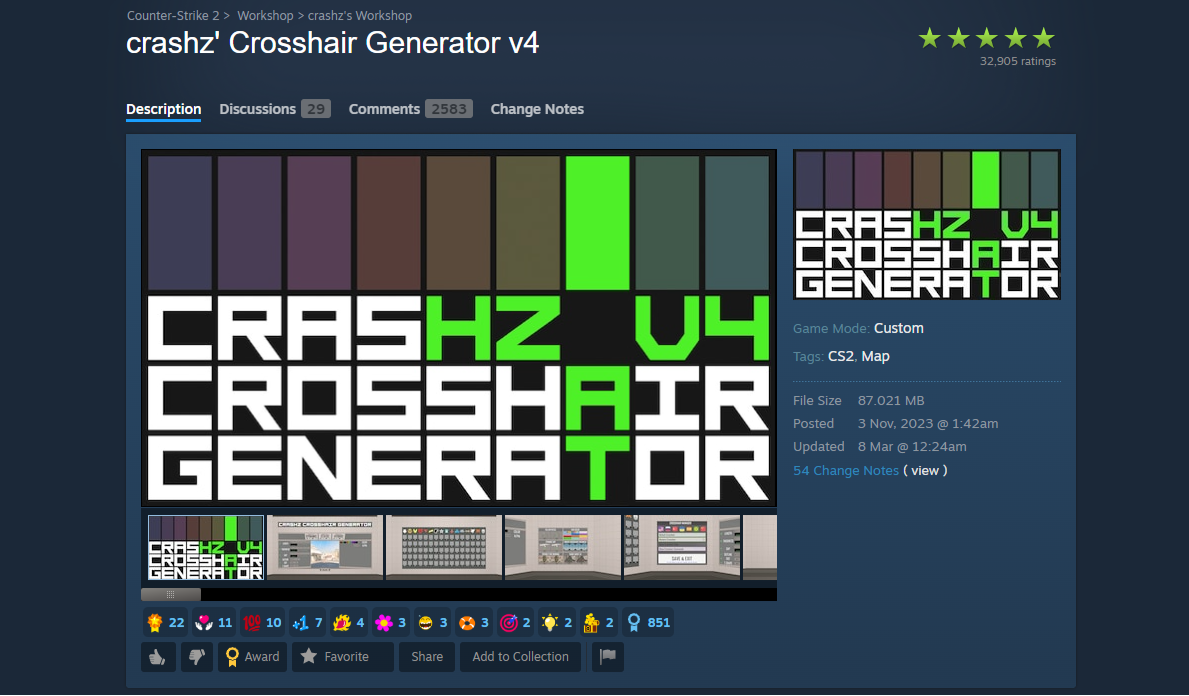
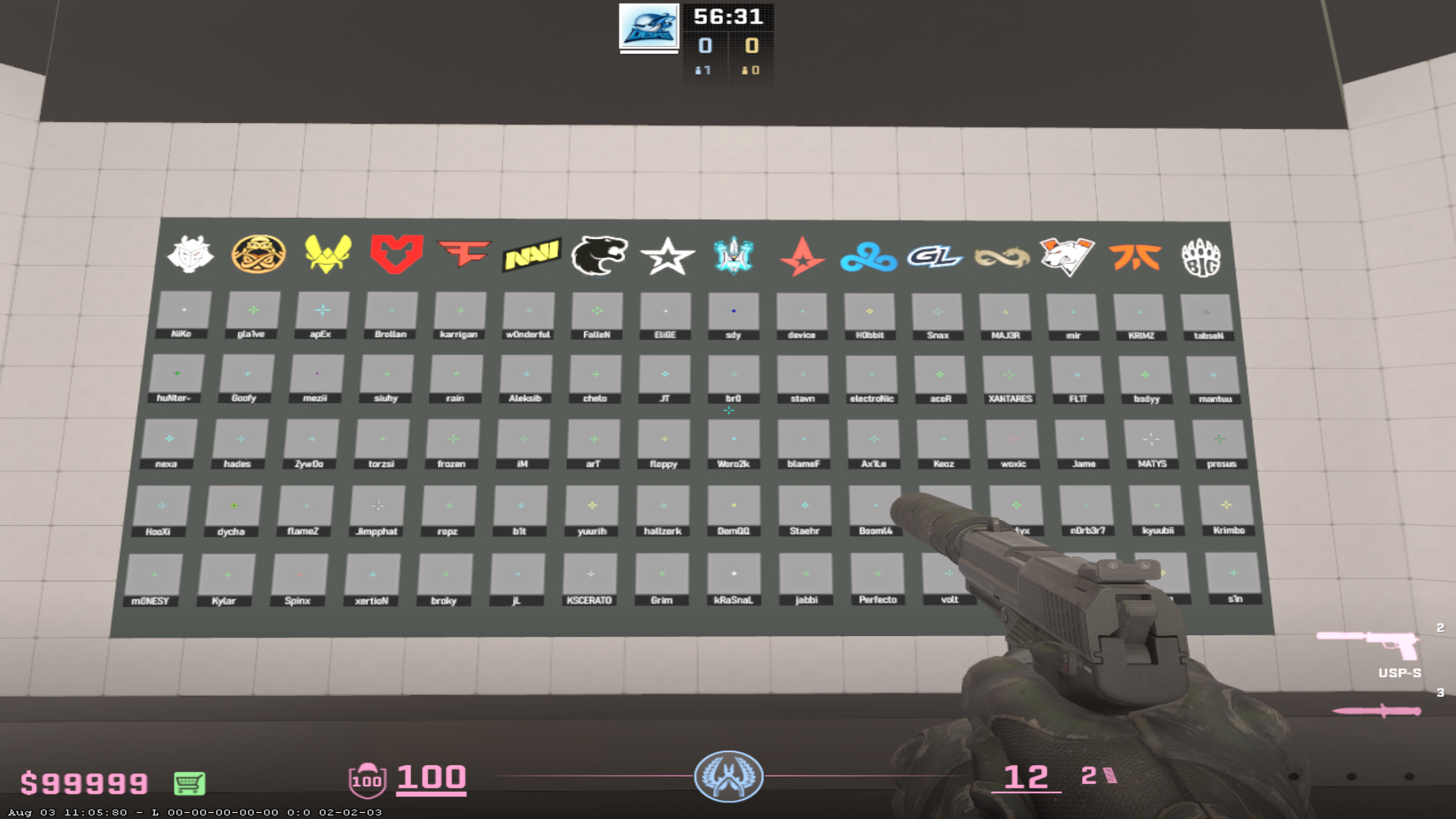
If you are afraid of getting confused in the settings and messing things up, there is a popular map in the workshop - crashz crosshair generator v4.

https://i.postimg.cc/Kctr4ySD/Screenshot-551.jpg
You can customize the crosshair on this map and see how it will look in the game. You can even shoot at bots to evaluate how the crosshair fits you when moving and spraying.
Another helpful feature of this map is the repository of crosshairs of professional players. You won't have to reinvent the wheel because, among 80 different variants, you may find the one that perfectly suits you.
FAQ
What is the best crosshair code for CS2?
According to player reviews, the best crosshairs are static, thin, and visible. However, personal preferences have remained; for some, other crosshairs are more suitable.
What is the donk crosshair code in CS2?
The donk’s crosshair code CSGO-HqNCm-zmBvH-eAd4P-hr5Dx-UJAfD. It features a slightly larger and highly visible design, making it ideal for aggressive play and fast engagements, while still maintaining good precision.
Can I create my own crosshair code in CS2?
Yes, you can fully customize your crosshair in CS2 by adjusting its size, thickness, gap, color, and behavior in the settings. Once configured, you can generate your own crosshair code using the “Share or Import” feature and reuse or share it anytime.
How do I find the best crosshair for my playstyle in CS2?
To find the best CS2 crosshair for your playstyle, focus on visibility and consistency. Colors like cyan, green, and yellow are the most reliable because they stand out on most maps. White is less commonly used since it can blend into bright areas.
For most players, a classic static crosshair is the best choice, as it provides stable aim in all situations. However, beginners may benefit from a dynamic crosshair, as it gives visual feedback on movement and shooting accuracy.